RSS stands for Really Simple Syndication — and for podcasting, it genuinely is that simple in concept. But if you've never encountered an RSS feed before, the XML files, feed URLs, and platform submission processes can feel opaque. This guide explains what a podcast RSS feed is, what's inside one, why it exists, and how modern AI podcast platforms handle the whole thing automatically so you never have to think about XML tags at all.
What Is a Podcast RSS Feed?
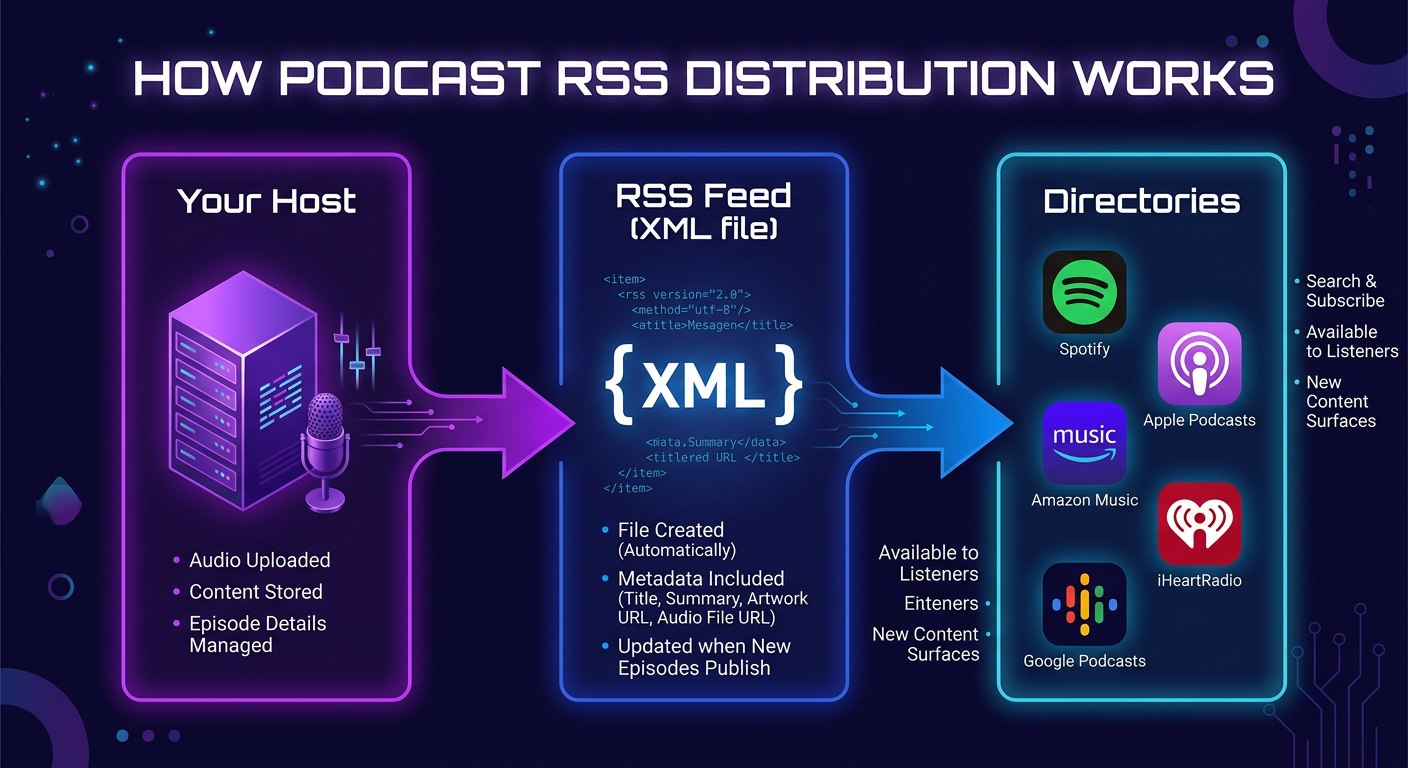
A podcast RSS feed is a text file in XML format that lives at a public web address (URL). This file contains structured information about your podcast and every episode you've published. Here's the key mechanic: instead of you uploading your podcast manually to each platform, you give each platform your RSS feed URL once, and from that point forward, every time you publish a new episode, every platform automatically fetches it from your feed.
Think of it like a newspaper subscription. You don't go to the printer each day to collect your paper — the paper comes to you. RSS is the subscription system for podcasts: platforms subscribe to your feed and the new episodes come to them.
RSS is not a proprietary format invented by Apple or Spotify. It is an open standard (RSS 2.0 specification) with podcast-specific extensions developed by Apple (the itunes: namespace) that every major directory recognizes.
Why Podcasts Use RSS
RSS became the podcast distribution standard for a practical reason: when podcasting emerged in the early 2000s, there was no central platform. Creators needed a way to let listeners (and eventually directories) know when new audio files were available — and RSS, which was already used for blog syndication, was the obvious answer.
Today, RSS remains the backbone of podcast distribution because:
- It's platform-neutral. Your feed works on every directory simultaneously. You don't depend on any single company's infrastructure.
- It's automatic. Once a platform subscribes to your feed, episode delivery is fully automated. No manual re-uploads.
- It gives you ownership. Your feed URL is yours. If you switch hosting platforms, you move the feed — all your subscribers follow automatically.
- It carries all metadata. Episode titles, descriptions, artwork, authors, categories, durations, and the audio file URL are all in the feed, so every platform displays your show consistently.
This is why publishing your podcast to Spotify starts with your RSS feed URL — and why getting your RSS setup right matters from episode one.
What's Inside a Podcast RSS Feed
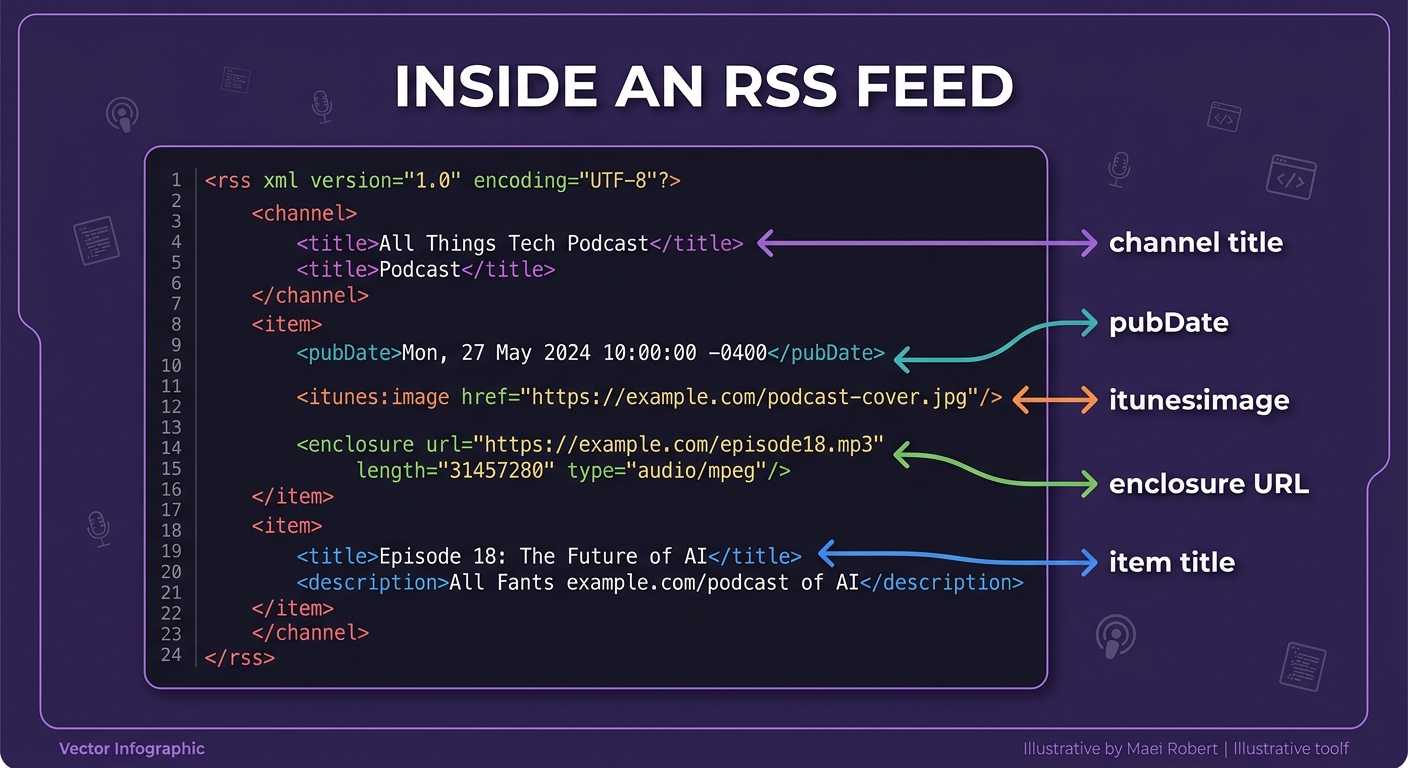
An RSS feed is an XML file, which means it's a plain text file with a specific hierarchical structure. You don't need to write or read XML to use podcasting — your hosting platform generates it automatically — but understanding the key tags helps you know what information matters.
Channel-Level Tags (Show Information)
These tags appear once per feed and describe your entire podcast:
| XML Tag | What It Contains | Example |
|---|---|---|
<title> | Your podcast's name | The PodGorilla Show |
<description> | Show description (plain text) | AI-powered interviews about tech |
<link> | Your podcast's website URL | https://podgorilla.com |
<language> | Language code | en-us |
<itunes:image> | Cover art URL (3000×3000px recommended) | https://host.com/cover.jpg |
<itunes:category> | Podcast category for directories | Technology |
<itunes:author> | Host/creator name | Jane Smith |
<itunes:explicit> | Content rating | false |
Item-Level Tags (Per-Episode Information)
These tags repeat for each episode and tell directories everything they need to display and stream an episode:
| XML Tag | What It Contains |
|---|---|
<title> | Episode title |
<description> | Episode show notes (can include HTML) |
<enclosure> | The most critical tag — contains the direct URL to your MP3 file, its size in bytes, and the MIME type (audio/mpeg) |
<pubDate> | Publication date and time (RFC 822 format) |
<itunes:duration> | Episode length (HH:MM:SS) |
<itunes:episode> | Episode number |
<itunes:season> | Season number |
<guid> | Unique episode identifier — must never change once set |
The <enclosure> tag is the most critical element. It tells every podcast app exactly where to find and stream or download the audio file. If this URL breaks or changes, the episode stops working across all platforms simultaneously.
"RSS is the lifeblood of podcasting. It's what makes the medium open, interoperable, and creator-owned. Any platform that bypasses RSS and requires direct upload only is fundamentally limiting your reach and your ownership of your audience."
— Podnews, The State of Podcast RSS (2025)
How to Get a Podcast RSS Feed
There are two ways to get an RSS feed for your podcast:
Method 1: Podcast Hosting Platform
Traditional podcast hosts — like Buzzsprout, Libsyn, Podbean, Anchor (Spotify for Podcasters), or Transistor — store your audio files and generate your RSS feed automatically. You upload your MP3, fill in episode metadata, and the host builds the XML. You then submit the host-provided feed URL to each directory.
Method 2: AI Podcast Platform (Automatic)
End-to-end AI podcast generators like PodGorilla handle RSS generation and directory submission as part of the publishing workflow. You generate your episode, hit publish, and PodGorilla manages your RSS feed and submits directly to Spotify, Apple Podcasts, YouTube, TikTok, LinkedIn, and Instagram — with no manual feed management required. This is the simplest path if you're starting fresh, especially if you're creating podcasts without traditional recording.
RSS vs. Direct Upload: What's the Difference?
Some platforms — notably YouTube and Spotify for certain content types — allow direct upload of audio/video files without using RSS. Here's how they compare:
| Factor | RSS-Based Distribution | Direct Upload |
|---|---|---|
| Reach | All directories simultaneously from one feed | One platform at a time |
| Ownership | You control your feed and audience data | Platform controls the relationship |
| Portability | Switch hosts, keep all subscribers | Locked to the platform |
| Automation | Publish once, all platforms update automatically | Must re-upload to each platform manually |
| Analytics | Host-level analytics; platform analytics separate | Platform analytics only |
| Best for | Any creator wanting broad reach and ownership | Platform-exclusive content strategy |
For most podcasters, RSS-based distribution is strongly preferable because it maximizes reach while keeping you in control. See our full podcast distribution guide for a platform-by-platform breakdown.
Common RSS Problems and Fixes
RSS issues are among the most common reasons a podcast doesn't appear correctly on directories. Here are the problems you're most likely to encounter:
Problem: Episodes Not Updating on a Platform
Cause: Most directories check your RSS feed every 1–24 hours. If you just published, wait up to 24 hours before concluding there's a problem. If episodes still aren't appearing, verify your feed URL is publicly accessible (open it in a browser — you should see XML code).
Problem: Feed Validation Errors
Cause: Missing required tags, malformed XML, or invalid characters. Fix: Run your feed through the free Cast Feed Validator or Podbase Podcast Validator. Both will identify specific line-by-line errors.
Problem: Cover Art Rejected
Cause: Apple Podcasts requires cover art between 1400×1400 and 3000×3000 pixels, JPEG or PNG format. Art below this resolution will be rejected. Fix: Re-export at 3000×3000px and update the itunes:image tag in your feed.
Problem: Episodes Have Wrong Duration or Missing Metadata
Cause: Your host may not be reading ID3 tags from your MP3 correctly. Fix: Embed duration, title, and author metadata directly into the MP3 file using a tool like Mp3tag before uploading.
Problem: GUID Changed, Causing Duplicate Episodes
Cause: If you change the GUID of an existing episode (e.g., after migrating hosts), directories treat it as a new episode and may re-publish it or show duplicates. Fix: Never change a GUID after an episode is published. When migrating hosts, ensure your new host preserves the original GUIDs.
Frequently Asked Questions
What is a podcast RSS feed?
A podcast RSS feed is a public XML file that contains all the metadata and audio file links for your podcast. When you submit your RSS feed URL to Spotify, Apple Podcasts, or other directories, they subscribe to it and automatically receive every new episode you publish. It is the universal distribution standard that powers podcast discovery and delivery across all platforms.
Do I need an RSS feed to publish a podcast?
To distribute your podcast across multiple major platforms simultaneously — Spotify, Apple Podcasts, Amazon Music, iHeart — yes, you need an RSS feed. Some platforms offer direct upload (like YouTube), but RSS is the only way to be available everywhere with a single publication action. AI platforms like PodGorilla generate and manage your RSS feed automatically.
How do I find my podcast's RSS feed URL?
Your RSS feed URL is provided by your podcast hosting platform. Log into your host account and look for "RSS Feed," "Feed URL," or "Distribution" settings. It typically looks like: https://feeds.yourhost.com/yourpodcast. If you use PodGorilla, your RSS feed is generated automatically and managed for you.
How often do podcast directories check my RSS feed?
Most major directories (Spotify, Apple Podcasts, Amazon Music) check RSS feeds every 1–24 hours. Apple Podcasts tends to check more frequently for active, high-engagement shows. If you need faster propagation, some hosts allow you to "ping" directories after publishing to trigger an immediate check.
Can I change my RSS feed URL?
You can migrate to a new feed URL, but it requires a 301 redirect from the old URL to the new one so that directories and subscribers follow automatically. Most podcast hosts that support feed migration will set this redirect up for you. Never simply abandon your old feed URL — all platforms pointing to it will stop receiving new episodes.
What's the difference between my RSS feed and my podcast website?
Your podcast website is a human-readable page where listeners can learn about your show. Your RSS feed is a machine-readable XML file that podcast apps and directories consume. They are separate things, though both use URLs. Your RSS feed's <link> tag typically points to your podcast website, connecting the two.