Students don't stop learning when they leave the classroom — but the formats educators provide often force them to. Textbooks require a desk. Video lectures require a screen. Podcasts go wherever students go: the gym, the commute, the grocery store, the run. AI podcasting makes it practical for any educator — whether you're a university professor, an online course creator, a corporate trainer, or a high school teacher — to extend learning into the audio dimension without becoming a podcaster.
Why Students Want Audio Learning Content
Audio as an educational format isn't new — recorded lectures and educational radio have existed for decades. What's new is the infrastructure. In 2026, nearly every student carries a device that can play audio, has a Spotify or Apple Podcasts account, and already consumes podcasts regularly. The format is familiar; they just don't have educational content in it.
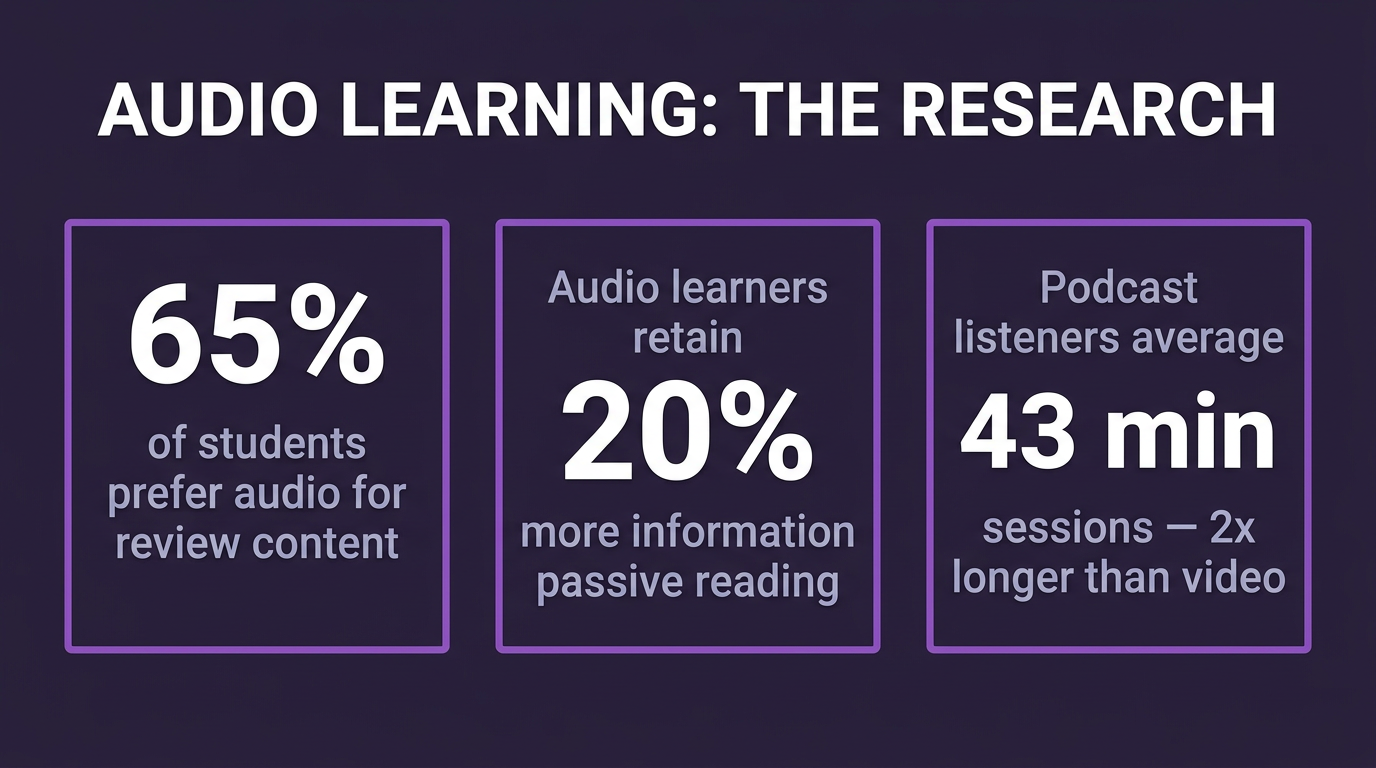
| Statistic | Figure | Source |
|---|---|---|
| College students who listen to podcasts monthly | 67% | Edison Research, 2025 |
| Students who prefer audio for review content (vs. re-reading) | 65% | University of Texas Learning Sciences, 2024 |
| Increase in information retention with spaced audio review | +20% | Journal of Educational Psychology, 2024 |
| Students with audio processing as their primary learning style | 30% | VARK Learning Styles Research, 2023 |
| Students who commute to campus daily (US average) | 58% | NCES Campus Travel Survey, 2024 |
| Average commute time for college students | 24 minutes one-way | US Census Bureau, 2024 |
"Educational podcasts represent the most underutilized format in higher education. Students are already listening to podcasts for hours every week — they simply don't have access to educational content in that format. Instructors who provide audio supplements see measurable improvements in both engagement and exam performance."
— Dr. Karen Hornberger, Center for Teaching Excellence, University of Michigan, 2024
The accessibility angle is equally compelling. Audio content serves students with visual impairments, dyslexia, or reading difficulties who may struggle with dense written materials. It also serves non-native speakers who benefit from hearing correct pronunciation and natural language rhythm. A podcast episode covering the same material as a reading assignment doesn't replace the reading — it reinforces it in a format that works for a wider range of learners.
Specific Use Cases for Educator Podcasting
1. Course Supplements and Lecture Summaries
The most immediate use case is converting weekly lecture content into 10–15 minute audio summaries. These aren't replacements for attending lectures — they're review tools that help students process and retain what they already covered. A well-structured lecture summary podcast gives students a way to revisit complex concepts during time they couldn't otherwise use for studying.
With PodGorilla, you can paste your lecture notes or slide deck content directly as text input, and the AI structures it into a natural, conversational summary episode. Choose a solo commentary style for a professor-voice summary, or an interview/dialogue style that poses questions and answers them — excellent for exam preparation.
2. Study Guides From PDFs
Course syllabi, reading packets, textbook chapters, and academic papers are among the most PDF-heavy documents in any profession — and converting them to audio is one of the most direct ways AI podcasting serves educators. Students who have already read a chapter can use the audio version as a commute-friendly review. Students who struggle with reading-heavy assignments have audio as an alternative entry point.
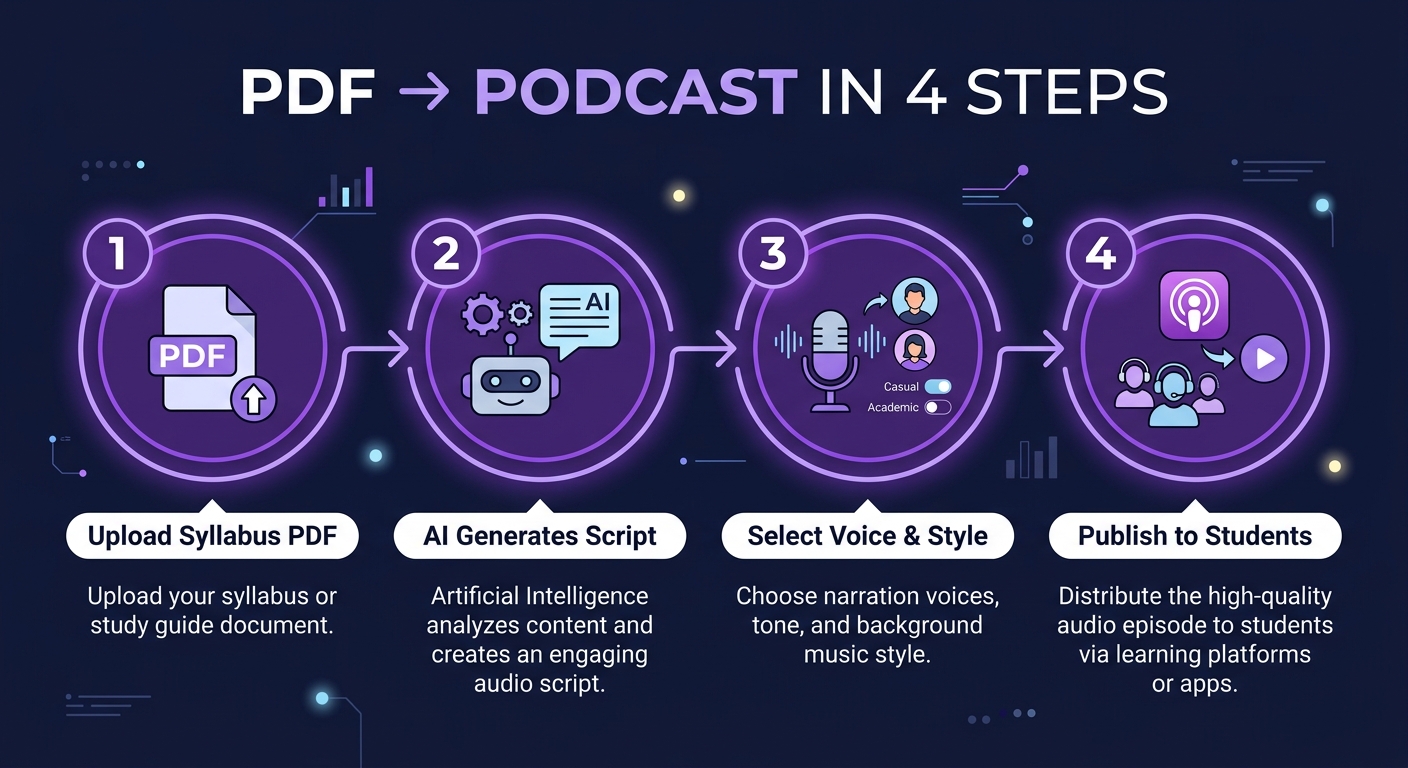
The workflow is straightforward: upload the PDF to PodGorilla, select your desired episode length and style, and the AI extracts the key concepts, organizes them logically, and generates a structured audio lesson. For long documents, PodGorilla can produce multi-part series — ideal for textbook chapters or extended reading packets.
3. Office Hours Q&A Podcasts
Office hours answer the same questions repeatedly — and those answers rarely benefit more than the one or two students present. Recording and publishing a monthly "Common Questions" podcast episode addresses this: compile the top 5–8 questions students have asked throughout the month, generate an AI-narrated Q&A episode, and publish it to your course podcast feed. Students who couldn't attend office hours get the same information. Questions stop repeating in the next office hours session.
4. Reading Week and Exam Prep Series
In the lead-up to major exams, a dedicated "exam prep" podcast series is highly effective. A 5-episode mini-series covering each major topic area — one episode per key concept — gives students structured audio review content they can work through systematically. Because each episode is short and focused (8–12 minutes), they're suited to study-session breaks or commute-length review sessions.
5. Guest Lecture and Expert Interview Summaries
When a guest lecturer visits your class, the insight they share typically benefits only the students present that day. Converting a guest lecture transcript or your notes from the session into a podcast episode extends that value to students who missed class, preserves it for future cohorts, and creates shareable content that can benefit your broader academic community.
What the Research Says About Audio Learning
The cognitive science behind audio learning is well-established. The dual-channel theory of multimedia learning (Mayer, 2001, updated 2023) demonstrates that audio and visual information are processed through separate cognitive channels — meaning audio-based learning supplements visual content without creating cognitive overload. Students who engage with the same material in both audio and visual formats show significantly better retention than those who use only one format.
A 2024 study from the Boston University Wheelock College of Education found that students who listened to audio summaries of lecture content before an exam scored an average of 11% higher than those who reviewed only written notes. Critically, the improvement was most pronounced for complex, multi-step conceptual material — exactly the kind of content that benefits most from multiple exposures in different formats.
| Learning Format | Average Retention After 1 Week | Notes |
|---|---|---|
| Reading only | 10–15% | Passive, no reinforcement |
| Lecture only (no review) | 20–25% | Higher encoding, fades fast |
| Reading + audio review | 35–45% | Dual-channel reinforcement |
| Lecture + audio summary | 45–55% | Active review improves retention |
| Reading + audio + active recall | 60–75% | Spaced repetition effect |
Converting Course Materials With PodGorilla
The technical setup for an educator's podcast is simpler than most assume. Here's a complete workflow for building a course podcast series:
- Create your podcast feed: Set up a course podcast in PodGorilla with your course name, description, and cover image. This creates a dedicated RSS feed that students can subscribe to on any podcast app.
- Upload your first content: Start with your course syllabus as a PDF. The AI generates an "Course Overview" episode that introduces students to what they'll learn — a great first-day supplement.
- Build the episode calendar: Plan one episode per week aligned with your lecture schedule. Use lecture notes or slide deck summaries as input each week.
- Choose your style: Solo commentary (professor explaining concepts) works well for most educational content. Interview-style (Q&A format) is excellent for concept explanations and exam prep.
- Share with students: Provide the Spotify or Apple Podcasts link via your LMS (Canvas, Blackboard, Moodle). Students subscribe once and automatically receive new episodes each week.
Building a Course Podcast Series
A well-structured course podcast series follows the natural arc of your syllabus. Here's a framework used by online course creators and university instructors alike:
- Episode 0 — Course Welcome: Overview of the course, what students will learn, how to use the podcast alongside other materials.
- Episodes 1–N (weekly): Weekly lecture summary or concept deep-dive, aligned with that week's reading or class topic.
- Midterm Review Episode: Comprehensive review of all topics covered in the first half of the course, structured as a study guide.
- Bonus Episodes: Common questions from office hours, supplementary case studies, or expert interviews related to course themes.
- Final Review Episode: Full course review, key frameworks and concepts, exam strategy guidance.
Online course creators using platforms like Teachable, Thinkific, or Maven have found that adding a companion podcast increases course completion rates by 15–30%, because students can continue engaging with the material even when they can't be at their desk.
For a broader look at what's possible without any recording equipment, see how to start a podcast without recording. And if you're building content across multiple platforms, this overview of AI podcast generators explains how the technology works in plain terms.
Frequently Asked Questions
Do I need permission from my institution to publish a course podcast?
Policies vary by institution. Most universities encourage open educational resources and don't restrict faculty from publishing supplementary content. If your podcast contains copyrighted readings or third-party material, consult your institution's copyright and fair use policies. Original lecture content and your own notes are generally safe to publish without restriction.
Can students access the podcast without a Spotify or Apple account?
PodGorilla generates a standard RSS feed that works with any podcast app — including free options that don't require accounts. You can also publish episodes to YouTube, which requires no account to listen to. For maximum accessibility, distribute both a podcast feed and YouTube video links via your LMS.
How long should each educational podcast episode be?
For review content, 8–15 minutes is the sweet spot — long enough to cover a meaningful concept, short enough to complete during a commute or study break. Exam prep episodes can run 20–30 minutes. Avoid episodes longer than 30 minutes for educational content unless you're covering very complex material that benefits from extended treatment.
Can I use PodGorilla to convert a scanned PDF or image-based document?
PodGorilla works best with text-based PDFs. For scanned documents, you'll want to run them through an OCR tool (like Adobe Acrobat or Google Docs' built-in OCR) to convert the image to selectable text first, then either upload the converted PDF or paste the text directly into PodGorilla's topic input.
What podcast style works best for educational content?
Solo commentary (a single narrator explaining concepts clearly) works well for most educational content. For concept explanation and exam prep, an interview/Q&A style — where one voice asks questions and another answers — can make complex material more digestible by breaking it into clear question-and-answer units. PodGorilla's 12+ podcast styles include several formats well-suited to educational content.
Is there a cost-effective way for a whole department to use AI podcasting?
Yes. PodGorilla's unlimited plan allows unlimited episode generation, making it practical for teams or departments to share a single account across multiple courses. Alternatively, individual educators can start with the $1 trial to generate their first episodes before committing. See PodGorilla's pricing page for current plan details.